Is my RFx or Security Questionnaire Ready for Iris?
Last updated: November 5, 2025
At Iris, we understand how challenging and complex RFPs can be. With thousands of RFPs processed, we’ve developed a streamlined solution to help you tackle them efficiently.
For a smoother experience, take a moment to prepare your document for upload:
Accepted File Formats:
Iris can process XLSX, CSV, DOCX and PDF.
For Excel Files:
Most Excel files are ready to upload as is. Here are a few exceptions / things to look out for:
Locked Excel files may have issues uploading.
Very complicated cell logic influencing what a cell shows across sheets can sometimes cause issues.
⬆In both of these cases, copy and paste the relevant text into a different, unlocked excel file, and upload that
A yes/no or multiple choice column that doesn't have a dropdown (data validation)
⬆In this case, add a dropdown or data validation, then specify that column as the dropdown column on upload.
For Google Sheets:
See the "For Excel Files" section above and make any necessary adjustments.
Download as an XSLX file.
For PDF Documents:
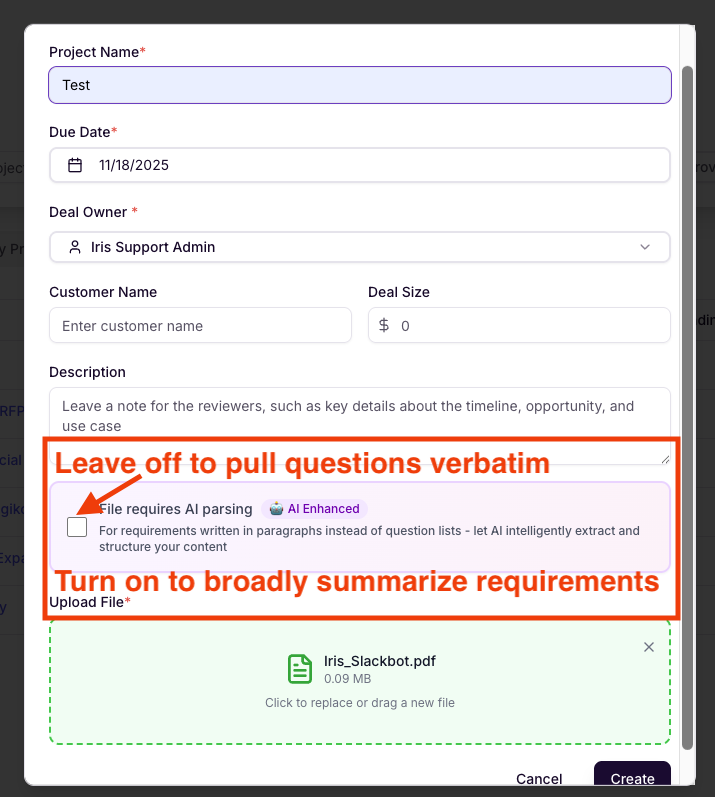
Decide whether you're going to use AI Parsing.
AI Parsing off: Iris will look for questions in the document and display them word for word for your review
With AI Parsing off, it's recommended that you isolate just the pages with questions (eliminating sections like company background, table of contents, legal terms, etc. will help focus Iris)
AI Parsing on: Iris will distill everything in the RFP into a set of open-ended prompts to help you organize, research, and flesh out a comprehensive response.
With AI Parse on, questions will not appear in the same order as they do in the originally document and multiple questions will be blended into overarching prompts.
For Word Documents:
Remove fluff from the document: Pull out intro paragraphs, evaluation criteria, and other non-question content from the doc. We just want the questions wherever possible.
Recommended: Isolate just the pages with the questions (eliminating Company background, tables of contents, legal terms, etc. will help focus Iris)
Now that your document is prepped, you're ready complete a project in Iris. For step by step instructions, see our Projects Guide: Completing Your First RFx or Security Questionnaire in Iris.
To learn more about how to use Iris and get certified on LinkedIn, check out our Course Academy!