Building Your Knowledge Map
Last updated: March 3, 2026
Check out a video showing how to add knowledge manually in Iris 👇
The knowledge map is a repository of all documents uploaded to Iris, providing a foundational understanding of your organization. Upload RFPs, case studies, or other knowledge documents into the Iris knowledge base for analysis and automation.
What Should I Put in My Knowledge Map?
Out of the box, Iris knows nothing about your business. Iris is only as powerful as the information you feed it. By populating your Knowledge Map with the right documents, you’ll ensure it has the context needed to provide accurate answers. And don't worry—if Iris doesn't know the right answer, it won't make one up.
Using Iris for RFPs and Security Questionnaires: Include all your security documentation. Think of it this way: Iris cannot answer security-related questions without key documents like SOC2 reports, accessibility statements, or encryption policies. We've listed some common one's below under "Core Documents".
Using Iris for Day-to-Day Productivity: Empower your team across the organization by using Iris to support their day-to-day tasks. Whether it's writing reports, crafting executive summaries, drafting emails, or completing other routine responsibilities, Iris can help streamline workflows and enhance productivity with accurate, tailored content. For this use-case, upload customer stories, competitive intelligence, demo slide decks, and other sales and marketing resources. These enrich Iris's ability to generate tailored, persuasive content.
Pro Tip: In fast-paced environments, the right answers can change rapidly. Focus on adding the most current and relevant information to your Knowledge Map first. As you work through projects, Iris will identify contradictions across your Knowledge Map, helping you refine and enhance your documentation over time.
Categorizing Your Knowledge Map
To make it easier to organize and maintain your knowledge map, think of your documents in three main buckets:
1. Core Documents
These are foundational documents that every organization typically has. Things like:
External Knowledge Base / Support Site
Website Content
Internal Knowledge Base
Company Handbook / Code of Conduct
SOC2, ISO 27001, or GDPR Assessments
Accessibility Documentation: VPATs, Screen Reader Testing, Mobile Usability, etc.
Recent RFP Submissions
2. Industry-Specific Documents
These documents vary depending on your industry or regulatory requirements. Is there an "acronym document" that applies to your industry?:
HECVAT, PCI DSS, HITRUST CSF, CMMC, NIST CSF, FedRAMP, CSA STAR
3. Company-Specific Documents
These are unique to your organization and help tailor Iris to your needs:
Customer Stories / Case Studies
White Papers
Demo Slide Decks
Competitive Intelligence
Competitor Battle Cards
Brand and Style Guides
Additional Examples of Documents to Include
Here’s a list of common documents across various industries that you might consider adding to your knowledge map:
Disaster Recovery Plans
Privacy Policies
Risk Management Frameworks
Implementation Guides
Encryption Policies
Password Policies
Network Security Policies
Vendor Governance Frameworks
Business Continuity Plans
Remember, the goal is to give Iris as much relevant context as possible. The more comprehensive your knowledge map, the better Iris will perform!
Uploading Content
Click
Knowledge Mapin the left-hand menu.Select
Upload Filesto add files from your computer.Select
Add Web Contentto pull information from a specific webpage or an entire website.Select
Add From Integrationsto add files from an via integration(Such as Google Drive, Sharepoint, Vanta, Drata, Highspot, Confluence, Notion, or Seismic)
File Type, Number, and Size:
Supported formats include PDFs, Word documents, Excel sheets, CSV, TXT, MD, and PPT/PPTx files.
You can upload up to 75 megabytes at a time. The slider at the top will tell you how close to the upload limit you are.
Confirmation:
For large files, "processing" will appear in yellow until the document is fully processed.

A green Done indicates a successful upload.
Managing Existing Content in Knowledge Map
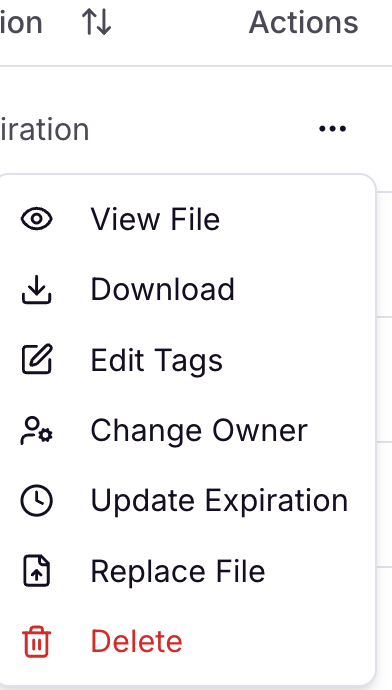
If updates are needed for content that is already uploaded into your Knowledge Map, you can navigate to the right column of the page under "Actions". From here, you can
Preview File
Download File
Edit the Tags applied to a file
Change the Owner of the file
Set an Expiration Date
Replace File (with an updated version)
Delete
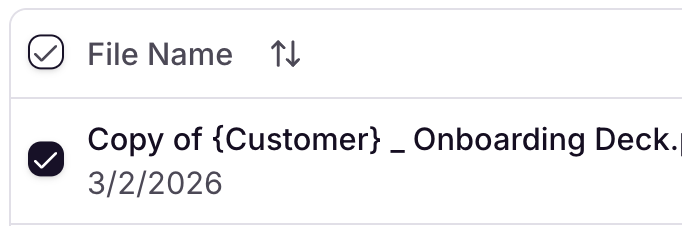
Making changes to multiple files? These actions can be taken for an individual file or for multiple files via the Bulk Actions menu. Simply check the box next to each file you want to apply changes to, and your Bulk Actions will appear at the bottom of the screen.

Interested in learning more?
To learn more about how to use Iris and get certified on LinkedIn, check out our Course Academy!