Iris Release Notes -- June 30th 2026
Last updated: October 8, 2026
Re-stage Adds New Answer Columns
When you re-stage a project, it now adds new answer columns to your existing questions instead of replacing them — so any answers you've already generated are kept safe.
Proposal PPTX Template Picker
You can now pick or switch your PPTX template at any point in the export process, even after your proposal has already been generated.
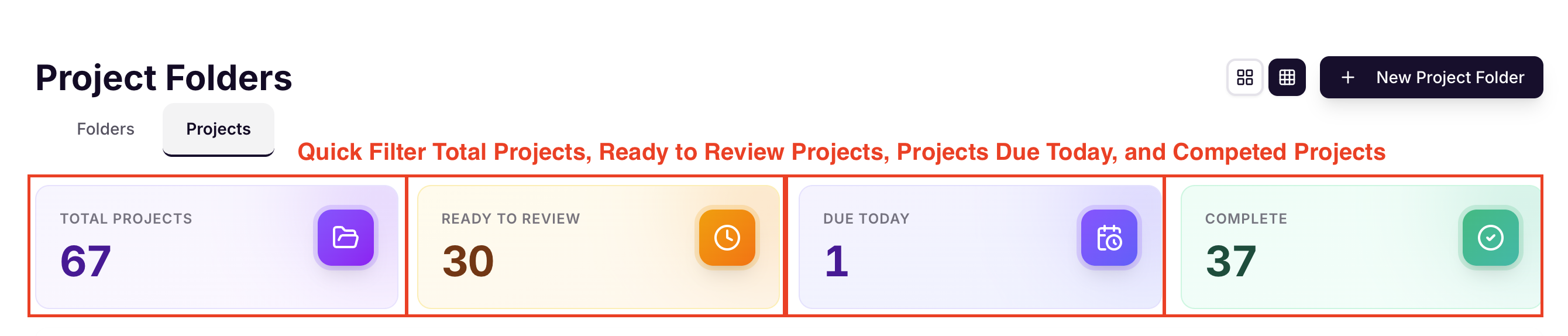
Project Hub Stat Card Shortcuts
The stat cards on your Project Hub overview are now clickable — click any number to jump straight to that filtered list of questions.
RFP Requirement Evaluation
RFP requirement analysis now runs in the background, so you're not stuck waiting on the page. Results show up as they're ready.
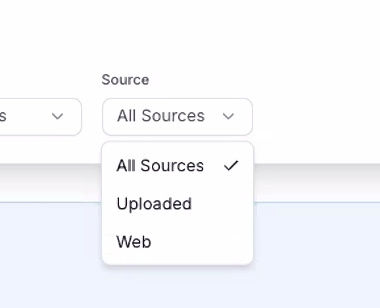
Knowledge Map Source Filter
You can now filter the Knowledge Map files page by source — Confluence, SharePoint, Google Drive, web, and more — to find what you need faster.
Microsoft Teams Auto-Connect
The Microsoft Teams integration now connects automatically the first time you use it — no manual setup required.
Persistent Web Crawl Progress
Web crawl progress now stays visible even if you navigate away or refresh the page, and the progress banner automatically disappears once the crawl finishes. Crawls on unsupported sites now fail cleanly right away instead of retrying forever.
Stuck Answer Recovery
If an answer ever gets stuck while generating, you'll now see a retry button to manually retry it yourself instead of waiting it out.
AI DOCX Editor
A new in-document editor for Word files lets you edit and approve answers right inside your document, with a toolbar and outline panel to navigate easily.
This feature is currently behind a flag — reach out to your CSM if you'd like it enabled.
Bug Fixes
"Annotate All Sheets" Hang on "&" Sheet Names
Fixed an issue where "Annotate All Sheets" would hang and skip highlights on Excel files with an "&" in a sheet name.Add New Question Produces No Answer
Fixed a bug where individually added questions sometimes didn't generate an answer. Answers now appear automatically once they're ready.Export Modal Title Overflow
Fixed a display issue where long project titles would overflow and break the export modal layout.RFP Evaluation Edge Cases
Fixed a few edge cases in RFP evaluation that could cause errors or show incorrect counts — these now resolve smoothly.GovSpend View for Unlicensed Users
Fixed the GovSpend panel for users without a license, and corrected an issue with past-meeting dates showing incorrectly.Federal CTA with Missing URL
Fixed an issue where a broken link could appear in the opportunities panel when no URL was available.SAML SSO Login Issue
Fixed a single sign-on configuration issue that was causing login failures for some organizations.Approved Answers Sync Failures
Fixed an issue that could cause some approved answers to fail to sync properly. Affected records have been automatically repaired.
Ready to give it a try? Sign in to your Iris workspace and get started!