Win/Loss Analysis
Last updated: May 28, 2026
The Win/Loss Analysis gives your team a clear view of how your RFP responses are performing across deals — what's winning, what's losing, and the ability to add commentary to help your team learn over time.
How It Works
Iris pulls your deal outcomes directly from Salesforce and surfaces them in a dedicated dashboard at Reports → Win/Loss. You'll see deal stats, a table of your deals organized by outcome, and the ability to annotate deals with comments.
With the Salesforce Integration
Projects will automatically update to Won or Lost when the linked oppurtunity gets marked closed won or closed lost.
Note: Win/Loss data requires your Salesforce integration to be active.
Accessing Win/Loss Analysis
Click the Win/Loss tab within Reports.
Don't see it? Ask Customer Success Manager to turn this feature on for you or email support@heyiris.ai
What You'll See
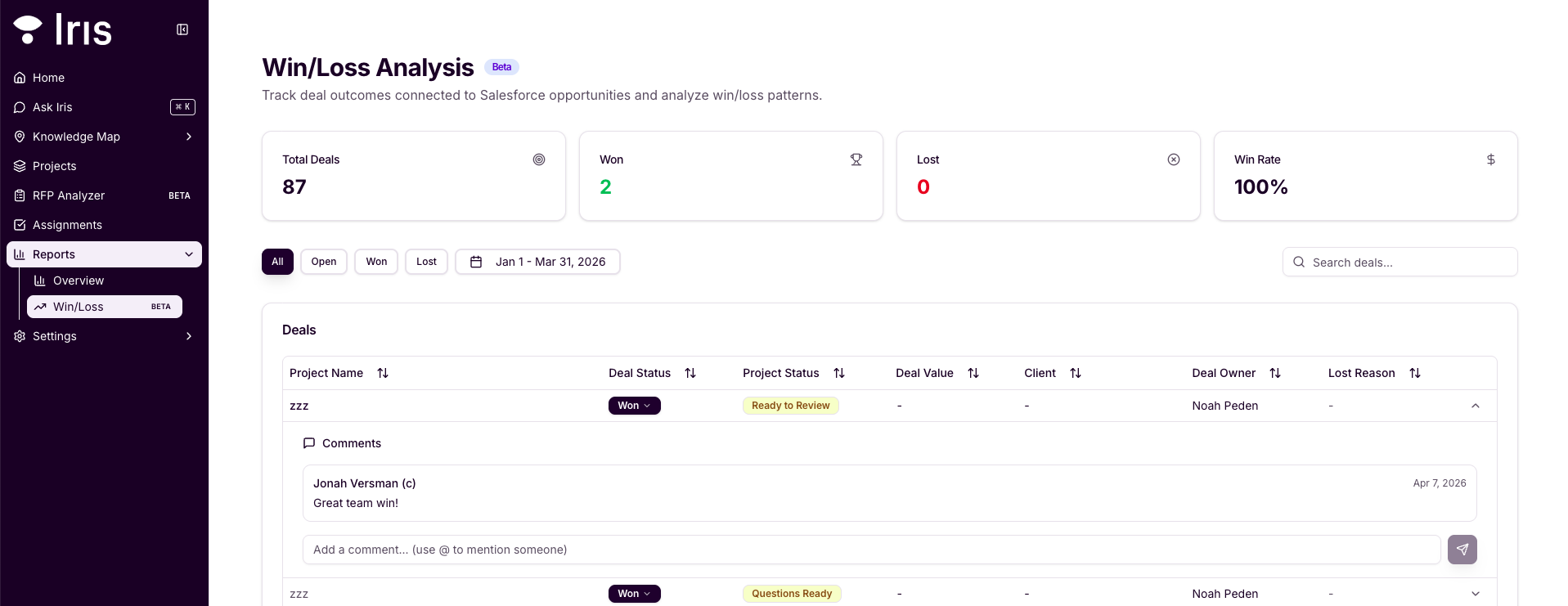
Stats A summary of your deal outcomes at a glance, including Total Deals, Won, Lost, and Win Rate.
Deal Table A table of your deals and their outcomes with the following columns: Project Name, Deal Status, Project Status, Deal Value, Client, Deal Owner, and Lost Reason. You can sort any column ascending or descending.
Comments You can add comments directly to individual deals to capture reasoning or notes for your team — for example, noting why a deal was lost or what worked on a win.
Filter by Date to see how Projects performed in a given range
Need Help?
Win/Loss Analysis is currently available in beta. Contact your Customer Success Manager to enable it for your account.