What to Do With a Low Confidence Answer
Last updated: November 20, 2025
When Iris generates an answer with low confidence, it means Iris is unsure about the accuracy or completeness of the response. This often happens when the Knowledge Map doesn’t contain strong or consistent information related to the question.
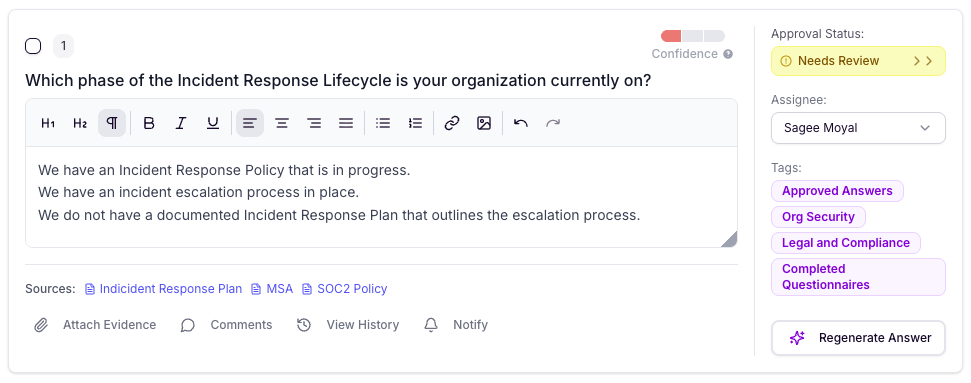
Below is an example of how Iris displays a low-confidence response:
What Iris Is Telling You
When Iris flags an answer as low confidence, it’s surfacing three key things:
What Iris knows – Iris shows all the sources that contain some information related to the question.
What’s unclear or incomplete – The generated answer will typically include mixed or conflicting statements.
Where the knowledge gap exists – Iris highlights that the existing documentation doesn’t fully support a confident or unified answer.
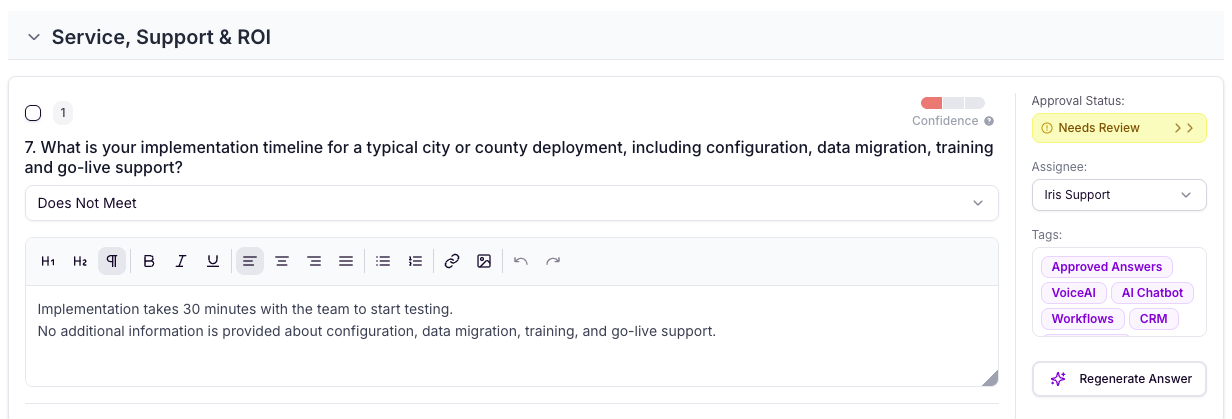
Note: Low-confidence answers should be taken with a grain of salt. They are not final answers — they’re indicators that your knowledge base needs strengthening.
Why This Matters
Low-confidence responses help you identify:
Missing policies or documents
Outdated content
Areas where different sources contradict each other
Topics where your organization has not yet documented formal processes
These moments are great opportunities to improve the quality of your Knowledge Map for future projects.
How to Strengthen Your Knowledge
Complete the project with the correct answer to fill in the knowledge gap. This stores the approved response as authoritative source material.
Ask Iris the same question and select "Edit and Add to Knowledge Map" to add one-off knowledge
Review the sources Iris has flagged and think about what additional files you could upload that have the answer.
Identify whether the needed information exists elsewhere (e.g., shared drive, internal wiki, SMEs).