Understanding Project Context and Custom Instructions
Last updated: March 25, 2026
Overview
Project Context and Custom Instructions are both powerful ways to help Iris better surface relevant context and generate responses shaped to your style, voice, and format. This guide is designed to help users understand the meaning of both fields and project setup, and how to use them effectively.
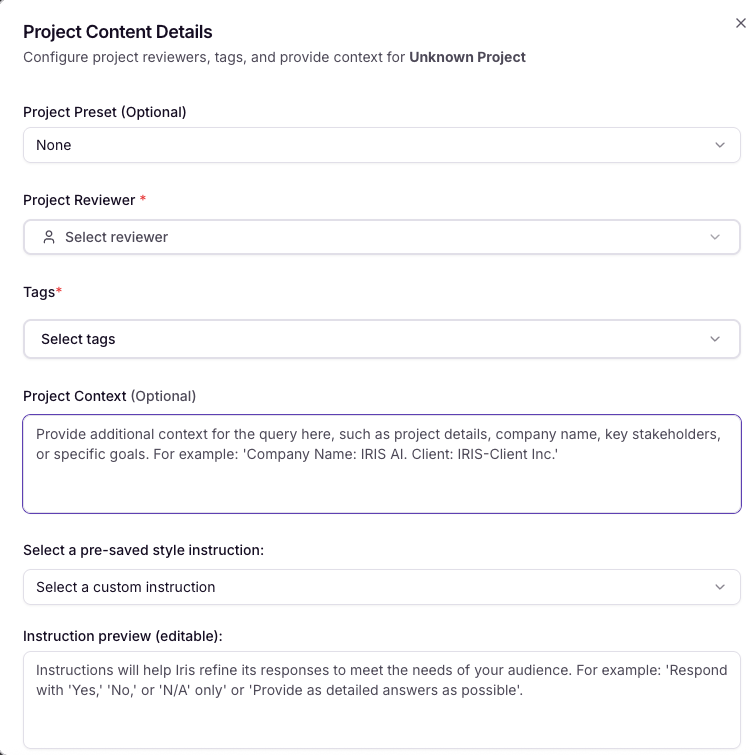
Project Context
Project Context is used to find the most relevant knowledge, helping shape the substance of your answer. For instance, if you include Project Context: "This prospect is a large bank," when Iris goes to search for context, it will specifically hone in on that retrieval step to look for relevant context related to other large banks.
In addition, Project Context gets used when generating responses to further help Iris understand the context of this project. Once all the context is retrieved, Iris will take into account the Project Context of the RFP being for a large bank and use that to further hone in on the actual output that is generated.
Note: Broad context is better than narrow context. For example, including "Sam wants to modernize their systems" can cause Iris to over-index on looking for other references of Sam in your Knowledge Map. Saying "wants to modernize their systems" would be the best approach to accomplish this.
Custom Instructions
Custom instructions are specifically used to style and shape responses once the context is generated. Custom instructions get used to decide:
Length
Tone of voice
Format
Sentence structure
Language of the final response
Custom instructions never impact the actual context that's retrieved by Iris.
For more information, read our complete guide here:📄 Instructions