Chatting with Iris to Mark Up Documents
Last updated: October 27, 2026
When you upload a questionnaire, Iris marks it up first: which cells are questions, where each answer goes, which rows are headers, dropdowns or context. The chat on the right of the staging area is the fastest way to fix what it got wrong. Instead of selecting cells and clicking Mark as buttons one at a time, you tell Iris what a column is and it changes the marks for you. On a sheet with ten questions that is a convenience. On a workbook with a thousand questions across twelve tabs it is the difference between an hour and a few minutes.
This article is about getting good results from that chat. It collects what has worked on customer onboarding and training calls. For the staging screen itself, the colors and the Mark as buttons, see Staging Area and Question Mapping.
The chat is part of Excel staging and is shown when enabled for your organization. Word files have their own Assistant tab, covered at the end.
Tell Iris what a column is, in plain language, and it updates the marks.
Check the first pass before you chat
Iris's first pass is usually right. Look before you start correcting.
Click Hide chat so the sheet has the full width, and look at every tab. Hidden sheets are skipped, so unhide anything Iris should read.
Open the Issues list if it appears. It tells you exactly what would stop generation, such as a question with no answer cell.
Make a short list of what is wrong, by column and row. Then bring the chat back and work through it.
Spend the time here. A column marked wrong at staging shows up in the export, and re-staging a project only adds questions. It cannot change the marks on questions that already exist.
How to phrase a request
Specify which column, row, and/or sheet.
Switch to the tab you mean first. Iris sees the active sheet in full and only summaries of the others. Name the sheet if you are talking about a different one.
Say what the cells are, and where the answers go. If you only say where the answers are, Iris guesses where the questions are. "Column C is the question, column F is the answer" removes the guess.
One job per message. Fix the headers, check the result, then move to the answer column. If a request covers thousands of cells, Iris may say the change was too large and ask for a smaller range, for example one column at a time.
Add the condition when columns depend on each other. "If column F is an answer and not a dropdown, do not mark column G" told Iris exactly which rows to leave alone.
What you want | What to type |
|---|---|
Answers belong in a different column | Answers are in column D, not column C |
A notes or instructions column | Column E is row context |
A disclaimer at the top that applies to every question | Rows 1 to 3 are shared context for all questions on this sheet |
Section titles were marked as questions | The numbered headings in column B are headers, not questions. Remove their question and answer marks |
Two answers per question | Column C is a dropdown with Yes and No. Column D is the free-text answer |
Group a column of questions under one name | Mark column F as a section called Cloud |
Nothing should be written in a column | Unmark column G |
Find out why something is flagged | Why is row 40 an issue? |
What Iris can change from the chat
Mark cells or ranges as questions, answers, dropdowns or headers, and remove those marks.
Move a mark, for example shift the answer column one to the right.
Create sections with a title.
Set row context, and shared context linked to questions on the same sheet.
Jump you to a cell or range so you can see what it means.
Explain an item in the Issues list, or fix it when you click Fix this issue with Iris.
What it cannot do:
Change the text, formulas or formatting of any cell. The marks are an overlay. Your file is never edited.
Edit the wording of a question. Use the pencil next to the question for that. Those questions will be worded differently in the Iris Project. They'll export back to their original wording.
Turn an empty cell into a Dropdown. If a cell has no real Excel dropdown, use Mark as Dropdown in the toolbar and enter the options there. You have to do this manually.
Change the marks on questions the project already has during a re-stage. Those are locked. Ask for ranges that leave them out.
Common fixes, and the words to use
Section headings marked as questions. Numbered headings such as "3. Evaluation criteria" often have an empty cell next to them, so Iris treats them as question and answer. Tell it: "The numbered headings in column B are headers. Remove the question and answer marks next to them."
A notes, priority, or question-ID column. Anything that helps answer a question but is not the question itself is context (marked in Orange). "Column E is context" attaches each row's note to that row's question. Iris then follows word limits, formats and references written there.
Apply a change to multiple sheets. Use something like "Across all sheets, mark the question ID's as context".
Guidance text sitting in the answer cell. Iris will skip marking cells that already have text in them (to prevent overwriting answers you've already worked on before uploading). You can still mark them and Iris will overwrite them when you export.
Checking for Issues
Iris lists out any issues with the intial or subsequent staying. You can click Fix all with Iris or click a specific cell to fix them manually. Clear all will remove all markings in a given section.
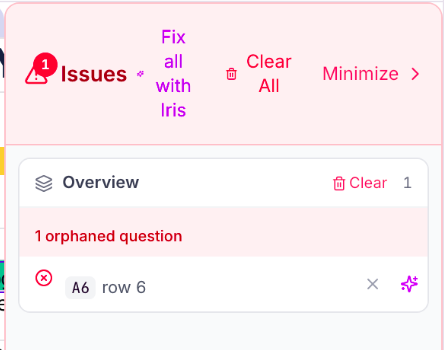
Click an issue to jump to it, or let Iris fix it.
Word documents
Word files open in their own staging screen with an Assistant tab, shown when enabled for your organization. The same habits apply, with a few differences.
Point at things by page, using the page counter in the viewer, which may not match the printed page number if you deleted pages before uploading.
A request that worked well on a 40-page RFP: "On page 17, the paragraph marked as a question should be context, and each bullet point should be a question with an answer space." Try it on one page, then repeat for the next.
Follow up with "Make sure every question has an answer space." Iris reports what it placed.
In Word, Iris can also set dropdown options, mark text to ignore, and apply a column role across similar tables.
You can select a question first and use Mark the answer spaces for the selected question, and there is a Stop button while Iris is working.
For the Word staging screen itself, see Answering Word (.docx) Questionnaires in Iris.