Opportunities Powered by GovSpend
Last updated: June 12, 2026
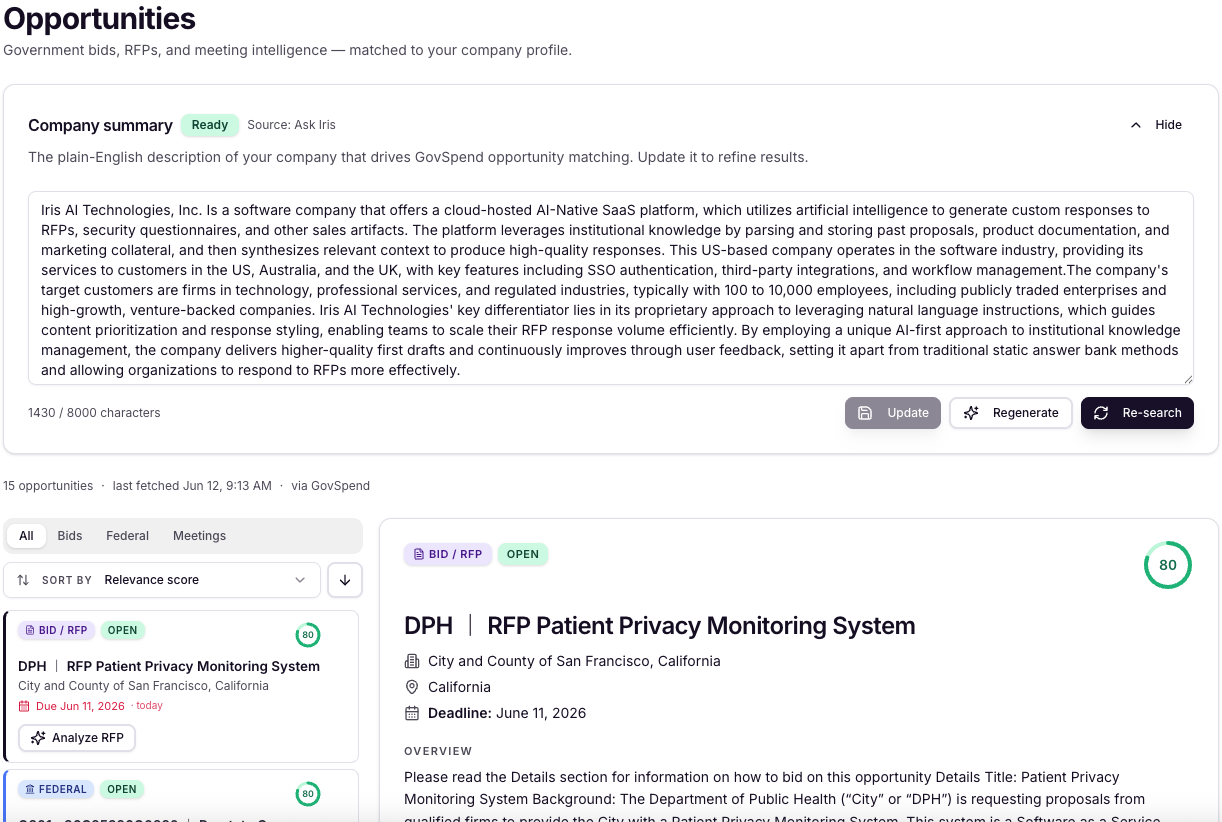
Iris surfaces relevant government bids, RFPs, and agency meeting records directly inside your workspace through an integration with GovSpend. Instead of manually searching for public sector opportunities, Iris finds them for you and ranks them by how relevant they are to your business.
How It Works
When you open the Opportunities view in your Iris dashboard, here is what is happening behind the scenes:
Company summary. Iris generates a short summary of what your company does using its Ask Iris engine. If you went through Iris's Cold Start onboarding process, that summary is used directly.
Keyword extraction. An AI model reads your company summary and pulls out the keywords that best describe your offerings and target market.
Opportunity search. Those keywords drive a live search through GovSpend's data, returning bids, RFPs, and government meeting records that match what you sell.
Relevance scoring. Each result is individually scored by an AI model based on how well it matches your company summary and keywords. The most relevant opportunities appear at the top.
If you update your company summary, Iris automatically clears the current results, re-extracts keywords, and runs a fresh search. The summary is the foundation of the whole process, so keeping it accurate leads to better matches.
What You See: Limited vs. Full Access
Access to opportunities depends on whether you hold a GovSpend license.
Without a GovSpend License | With a GovSpend License | |
|---|---|---|
Opportunities visible | 3 (preview) | Unlimited |
Data refresh | Every 2 days | Live / on-demand |
Full bid and RFP detail | Limited | Full access |
Update company summary | Not available | Available |
The 3-opportunity preview is designed to show you the kind of results waiting for you. A full GovSpend license unlocks unlimited access, live refresh, and the ability to regenerate your company summary and search on demand.
Federal vs. SLED Opportunities
Iris treats federal and SLED (State, Local, and Education) opportunities differently, and it is worth understanding why.
SLED opportunities include the actual RFP file. Iris can pull that document, analyze its requirements, and generate a structured proposal response for you. In practice, Iris can extract dozens of individual requirements from a single RFP and produce a draft response automatically.
Federal opportunities do not include a source file through the integration. You will see the opportunity overview and can click through to view the full posting on GovSpend directly. Federal results are useful for staying informed and tracking what agencies are pursuing.
Government Meeting Records
In addition to bids and RFPs, Iris also surfaces AI-generated summaries of relevant government agency meetings. These are not verbatim transcripts. GovSpend provides a summarized version of the meeting content that is relevant to your search keywords, and Iris presents that summary inside your workspace. You can use a meeting record as the starting point for a sales proposal directly from the Opportunities view.
From Opportunity to Proposal
For SLED opportunities that include a file, Iris's full workflow applies. Once an RFP surfaces, you can open it in Iris, review the extracted requirements in the Analyzer, and start a proposal response without leaving the platform. The integration is not just a discovery tool; it feeds directly into Iris's core proposal generation capability.
Frequently Asked Questions
Do I need to set up a GovSpend account to see any opportunities?
No. The limited preview of 3 opportunities is available without a GovSpend license. A license is required to access unlimited results, live refresh, and full bid documents.
What happens when I change my company summary?
Iris clears your current opportunities, re-extracts keywords from the new summary, and runs a fresh search. The update takes a few seconds because it involves multiple AI steps. Note that this option is only available to customers with a GovSpend license.
Why can't I get the full federal RFP document?
Federal and SLED data are stored separately within GovSpend, and source files are not available through the integration for federal opportunities. You can view the full federal posting on GovSpend's website using the link provided in Iris.
How does Iris know which opportunities are relevant to me?
Every opportunity returned from GovSpend is passed through an AI model that compares it against your company summary and assigned a relevance score. Higher scores mean a stronger match to what your company sells.
Interested in having this enabled for your Organization? Contact your Iris Customer Success rep at cs@heyiris.ai